Reading the listing…
Pulling metadata, screenshots and recent reviews from the App Store.
Reading the listing…
Pulling metadata, screenshots and recent reviews from the App Store.
Solid listing with a few clear gaps to close.
Land the top 3 fixes below and this listing reaches 81/100 · 7,168 m (High Camp).
 5,663 m
Ordered by how many points each one adds to the score. Start at the top.
6/30 characters used.
The title is the heaviest ranking field. You have 24 characters unused: add your strongest keyword after the name, e.g. “Greeky: <main keyword>”.
Title is the name alone.
Nobody searches for a name they have never heard of. Append what the app does in the words people type (“Habit Tracker”, “Budget Planner”).
42 ratings.
Rating volume feeds ranking and trust. Add an in-app prompt at a positive moment; most apps collect 1 to 3 percent of active users this way.
On iOS, only the title, subtitle and hidden keyword field count for search. The description does not. Words you only mention there are invisible.
3 unique words. Apple combines them, so “budget” and “planner” also rank for “budget planner”.
The first three do most of the selling: they appear directly in search results. Read them as a stranger would, in two seconds.
 1 · in search
 2 · in search
 3 · in search
 4
4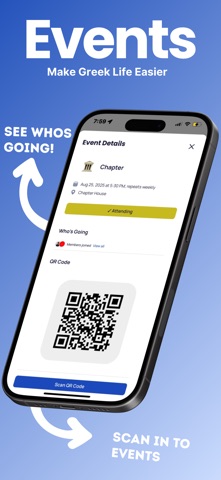 5
5Grouped by theme from the most recent written reviews. Run this on a competitor and the complaints become your feature list.
Reads the recent reviews in any language and tells you what to fix, and what a competitor could exploit.
All-time: 98% five-star across 42 ratings.
No recurring complaints in recent 1–2★ reviews.
Apps Apple shows next to this one, run through the same audit.
Metadata Studio checks character limits, wasted words and keyword coverage as you type.
Audit of the public listing as of today. The hidden 100-character keyword field cannot be read from outside App Store Connect, so it is not scored.
1 language.
Each localisation adds a new title, subtitle and 100-character keyword field. Even without translating the app, localise the listing for ES, DE, FR, PT-BR and JA.
0 iPad screenshots.
The app runs on iPad but shows few or no iPad screenshots. iPad visitors see a weaker listing.
First paragraph is 1170 characters.
Only about three lines show before “more”. Put the single strongest benefit in the first 170 characters.
Three title and subtitle options plus a keyword field, each checked against Apple's character limits.
The description keeps coming back to these, but the title and subtitle skip them. Check each one in Keyword Scout and move the winners into the keyword field.
Live position in Apple's search results. Checks are saved in this browser, so the next visit shows what moved.
Positions come from Apple's public search API and can differ by a few places from what a phone shows.
 6
6 7
7 8
8 9
9“My chapter started using the app. It’s very well designed and organized. Very helpful to keep track of study hours and other stuff. Highly recommend using!!”
“My chapter started using greeky not too long ago and we love how easy it is to use and how many more features it has compared to other apps we have tried.”
“Helps a lot with chapter organization, the study zone feature is really neat aswell, definitely reccomend for other charges.”
“I’ve used a greek life website before that was nowhere close to Greeky when it comes to design and simplicity. This one definitely deserves a 5 star rating! and I’m loo…”
“It has really helped our chapter understand what we need to do for study hours, and has motivated us to improve our grades.”


